 Waveline
Before you start
Copy every card to your drive and keep one folder per camera or recorder — the way most of us offload anyway. Names don't matter: A7S III, Cam B, Card 2 all work. Make sure every camera recorded sound, even from its built-in mic: that sound is what Waveline listens to.
The steps
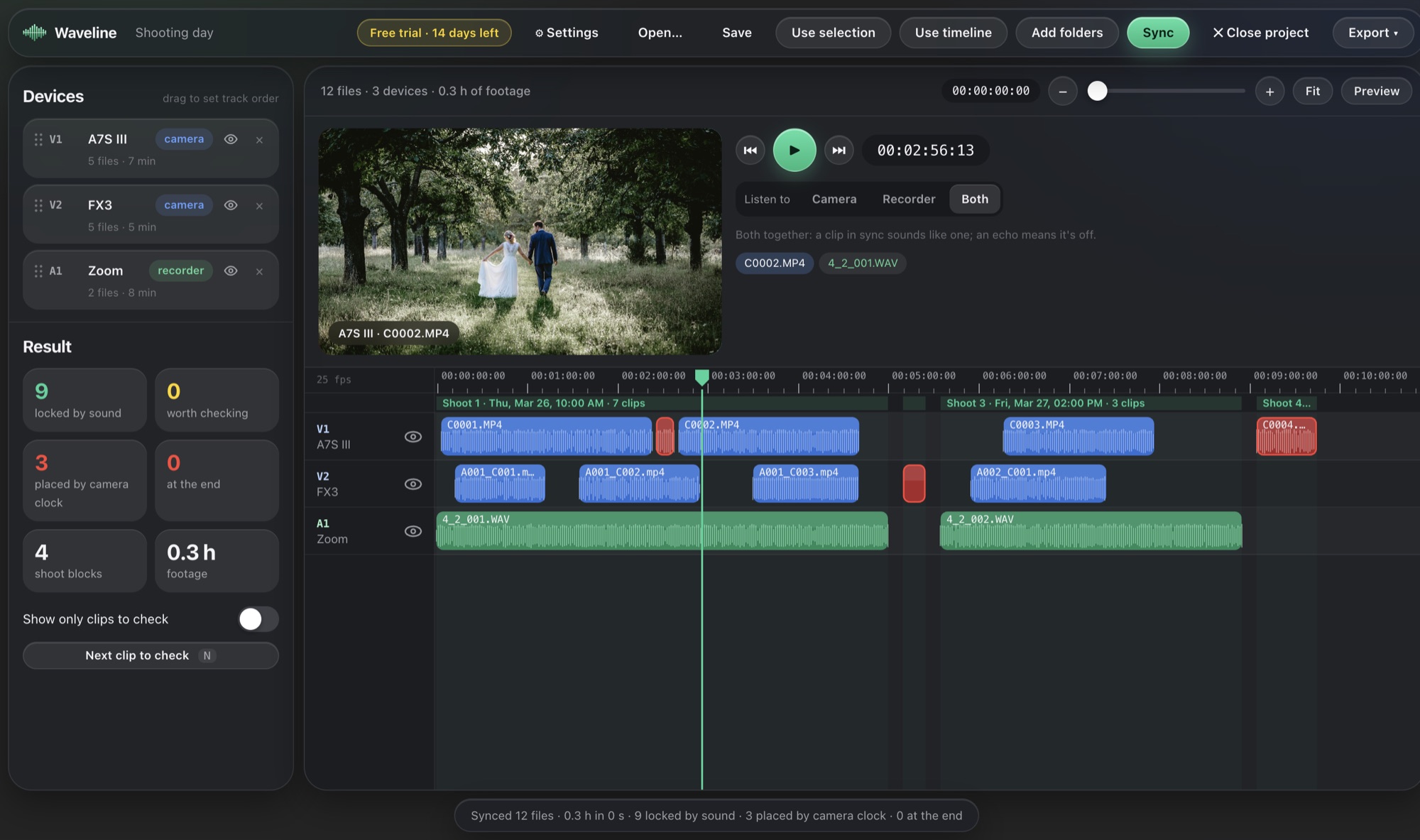
- Add the dayOpen Waveline and drag in the camera and recorder folders — or one folder that holds them all. Each camera and recorder appears in the Devices list.
- Check the devicesMake sure recorders show a green recorder badge and cameras a blue camera badge. Drag them into the track order you want in your edit.
- Press SyncWaveline fingerprints every file and starts matching. You'll see clips slide into place on the timeline as they're heard together.
- Look at the resultThe panel on the left counts clips locked by sound, clips worth checking and clips placed by the camera clock. Most days need little or nothing.
- Check the yellow onesTurn on Show only clips to check and press N. Play with Space and listen to Both: a synced clip sounds like one; an echo means it's off. Nudge with the arrow keys or drag — it snaps to the best match.
- ExportChoose Export and your editor. Turn on Correct drift for long takes and Matching timecode if you'll make a multicam clip.
- Open it in your editorPremiere: File › Import the XML. Resolve: File › Import › Timeline. Final Cut: double-click the FCPXML. Every camera is on its own track, in sync.
Why some clips are left at the end
A clip can only be synced by sound if something else was recording at the same moment. A camera that filmed during a break in the recorder, or a drone with no sound, has nothing to match. Waveline doesn't guess: it marks these clips red and lets you choose — put them at the end, or keep them in place by their camera's clock. The clock is corrected using that camera's synced clips, so a camera set to the wrong time still lands close.
Tips for faster, cleaner syncs
- Let one recorder run all day. It ties every camera together and keeps the best clock.
- Keep camera mics on, even if you won't use their sound.
- Don't merge cameras into one folder — one folder per device lets Waveline put overlapping clips on the right tracks.
- Save the project (⌘S) so you can export again later without re-syncing.
More: syncing a field recorder, weddings, drone and GoPro, and the full docs.